
TL;DR
Automation alone does not create an efficient accounting firm. The real advantage comes from connecting technology, people, outsourced teams and review into one controlled compliance process.
- Author
- WIS BPO
- Published
- Published
- Last updated
- Updated
- Reading time
- 5 min read
- Category
- Compliance
Accounting firms have spent years investing in technology. Bank feeds, receipt capture tools, cloud bookkeeping, workflow software, payroll systems, automated reminders and AI tools are now common across the profession. Yet many partners still feel overloaded. The reason is that owning good software is not the same as having a well-designed automated operating model. A firm may use several excellent systems and still rely on employees to move information manually between them, chase clients for missing records, decide what happens next and escalate routine issues to managers or partners. This is where compliance automation orchestration becomes important. Instead of looking at automation as a collection of individual tools, orchestration focuses on how the entire compliance process fits together. It defines which tasks should be handled by software, which should be completed by people, where outsourced support fits and when senior review is required. The objective is not to automate everything. It is to create a workflow where each task moves to the right resource at the right time.
What Does Compliance Automation Orchestration Mean?
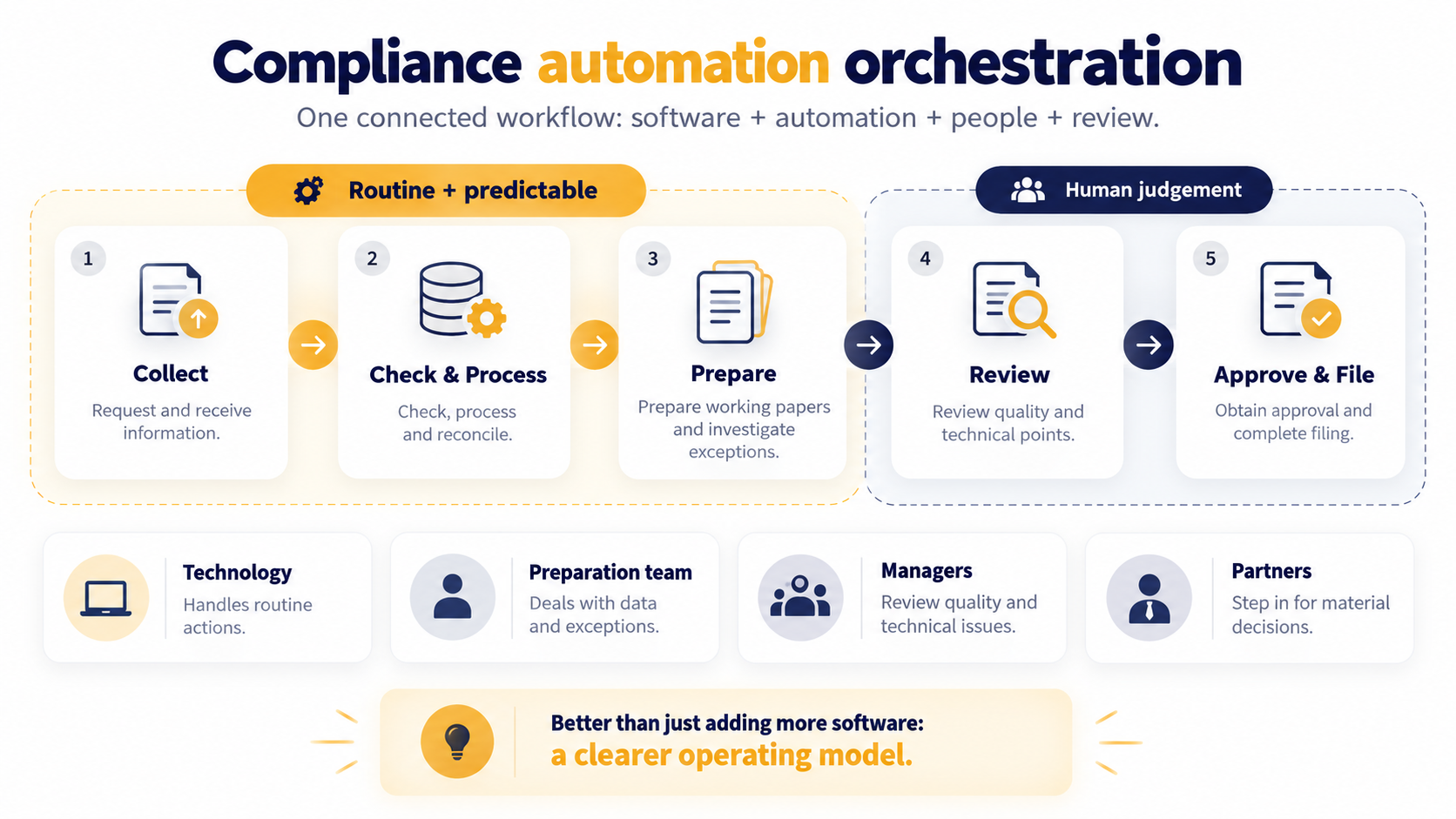
Compliance automation orchestration is the coordination of software, automated actions, human preparation and review across one connected workflow. Think about a typical compliance process. Client information needs to be requested and collected. That information then needs to be checked, processed and reconciled. Working papers must be prepared, exceptions investigated, technical points reviewed and client approval obtained before the final filing takes place. Some of those steps are repetitive and predictable. Others require human judgement. A good orchestration model separates the two. Technology handles the routine actions. Preparation teams deal with data and exceptions. Managers review quality and technical issues. Partners become involved when there is a material decision, complex judgement or important client conversation. This creates a clearer operating model than simply adding more software.
Why Automation Alone Often Fails
One of the biggest mistakes firms make is assuming that automating several individual tasks will automatically improve the entire process. Imagine that a workflow system sends an automated reminder asking a client for bookkeeping records. The client uploads several documents and the system automatically creates a preparation task. The accountant opens the job and discovers that two bank statements are missing. They now need to stop the work, send another request manually and wait for the client to respond. Technically, several stages were automated. Operationally, the workflow is still inefficient. A properly orchestrated process would include a readiness check between document collection and preparation. The job would only move forward once the minimum required information had been received. That small distinction matters. Automation should remove unnecessary work, not simply move incomplete work through the system faster.
Build the Workflow Around Exceptions
The best accounting automation strategies do not attempt to remove people entirely. Instead, they remove predictable activity so people can focus on the exceptions that actually require attention. For example, bookkeeping software can import bank transactions automatically and match recurring items based on existing rules. The preparation team can then focus on unusual or unmatched transactions rather than reviewing every line manually. Managers can do the same at review stage. Instead of checking every routine transaction, they can focus on material movements, unusual balances and technical issues. The workflow therefore becomes: Automation handles predictable activity → preparation resolves exceptions → senior staff apply judgement. That structure allows each level of the team to spend more time on work that matches its experience.
The Four Layers of an Orchestrated Compliance Workflow
A practical compliance workflow can usually be divided into four main layers.
| Layer | Main Role | Typical Examples |
|---|---|---|
| Automation | Predictable repetitive activity | Reminders, bank feeds, recurring tasks |
| Preparation | Processing and exception handling | Reconciliations, working papers |
| Review | Quality control and technical judgement | VAT review, accounts review |
| Partner/Client | Advice, approval and material decisions | Complex issues, client discussions |
Problems arise when work sits in the wrong layer. If partners are regularly chasing records or correcting basic reconciliations, the workflow is not making good use of senior capacity. Equally, if software is being allowed to make technical decisions that require professional judgement, too much responsibility has been pushed into automation. The purpose of orchestration is to create clear boundaries between each layer.
Start With the Process, Not the Software
Many automation projects begin by asking what a particular system can do. That is usually the wrong starting point. Before buying another tool or enabling another feature, map the process that already exists. Take VAT as an example. Document how client records are requested, how completeness is checked, who performs the bookkeeping, how exceptions are identified, who prepares the VAT calculation, who reviews it, how client approval is obtained, who submits the return and where evidence is stored. Once the entire workflow is visible, the firm can identify the steps that are repetitive and predictable. Those are usually the best places to introduce automation. Technology should support the workflow. The workflow should not be redesigned purely around the latest software feature.
Automate Client Chasing Without Damaging the Experience
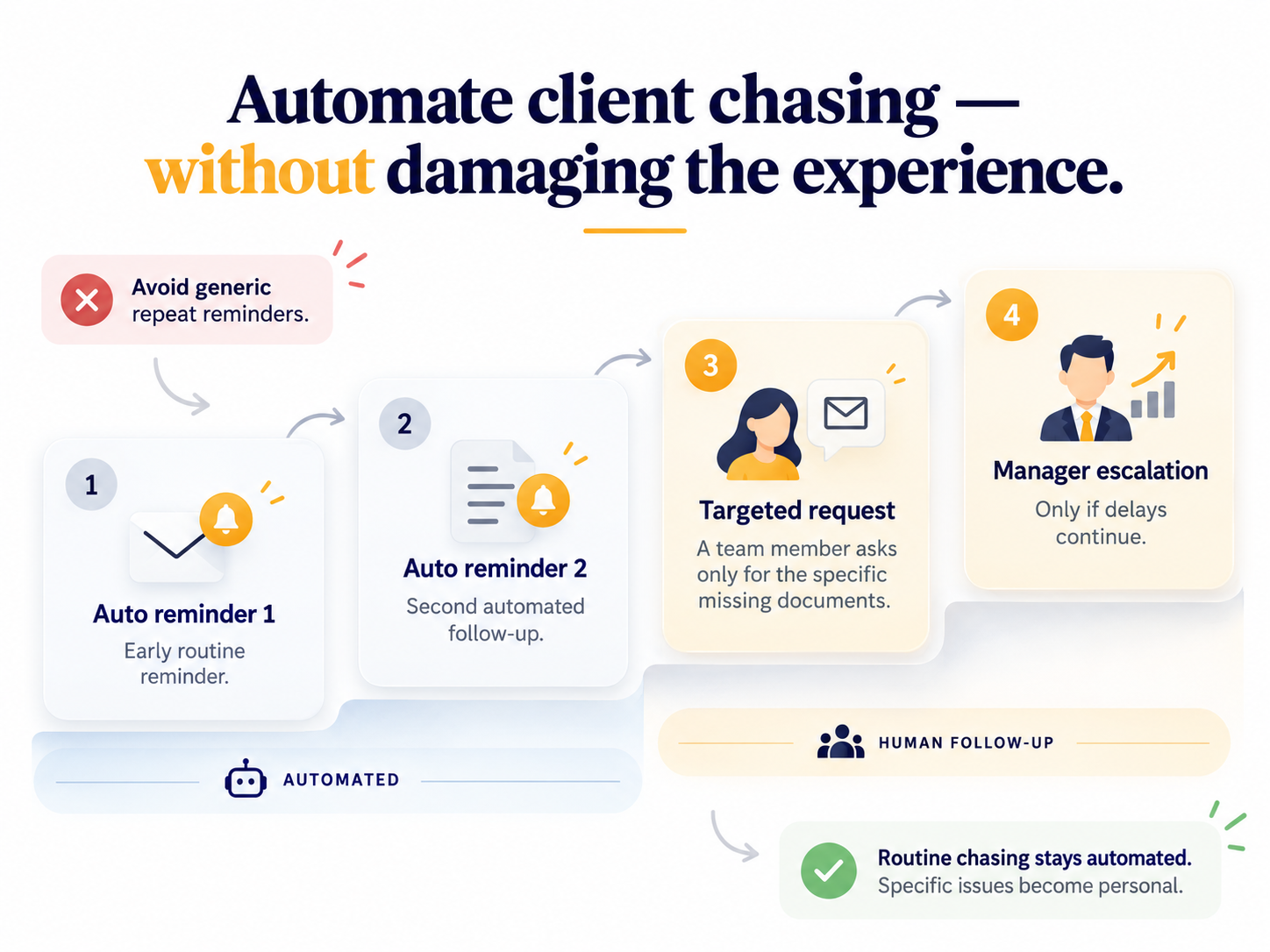
Client reminders are one of the easiest parts of an accounting process to automate, but they can also become one of the most irritating. A client who has already provided most of the required information should not continue receiving generic messages asking them to upload everything again. A better approach is to use automation for the early stages and bring people in when the process becomes more specific. For example, the first reminder can be automated, followed by a second automated reminder. If particular documents are still missing, a team member can send a targeted request. Continued delays can then be escalated to a manager. This keeps routine chasing away from senior employees while still allowing the client experience to remain relevant and personal.
Create a Clear “Ready for Work” Stage
One of the most useful workflow rules is deciding when a job is actually allowed to enter preparation. A document upload should not automatically mean the job is ready. Before preparation begins, the firm should confirm that the minimum information required to complete the work is available. Depending on the service, this may include:
- Bank statements
- Sales information
- Purchase records
- Payroll data
- Loan statements
- Previous-year working papers
- Client confirmations
If key information is missing, the job should move into a separate exception stage. This prevents accountants from repeatedly opening incomplete jobs, stopping work and restarting them later. It also makes workflow reporting more accurate because “in preparation” genuinely means the job can move forward.
Where Outsourced Teams Fit Into the Model
Not every repetitive accounting task can be handled entirely by software. Many activities are structured and repeatable but still require human interpretation. This is where outsourced accounting teams can become part of the orchestration model. For example, software may collect the records and import the data. An outsourced team can then perform reconciliations, prepare working papers and resolve routine exceptions. A UK manager reviews the output, while the partner becomes involved only where there is a material technical issue or client-facing decision. This creates a scalable preparation layer between technology and senior review. The aim is not to replace the internal team. It is to stop highly experienced people from spending time on work that can be completed elsewhere under a controlled process.
Define Where AI Belongs
AI is becoming increasingly useful in accounting workflows, particularly for tasks such as document extraction, email summarisation, transaction categorisation, drafting query lists and identifying unusual movements. However, firms need clear boundaries. AI should support professional judgement, not silently replace it. Every AI-supported workflow should answer four questions:
- Who checks the output?
- What data can be entered into the system?
- What happens when confidence is low?
- Where is human review mandatory?
If those questions cannot be answered, the process is not sufficiently controlled. AI should therefore be treated as another layer within the workflow rather than as a substitute for review.
Do Not Automate a Bad Process
If a process is unclear manually, automation usually makes the confusion happen faster. For example, if nobody knows who is responsible for chasing missing client records, adding automatic notifications will not fix the ownership problem. The underlying process needs to be simplified first. A useful rule is: Simplify → Standardise → Automate → Measure First remove unnecessary steps. Then define one consistent process. Assign ownership. Only then should technology be introduced. Firms that skip the first two stages often end up with expensive systems that employees eventually work around.
Build Escalation Into the Workflow
A strong automation strategy should not only describe what happens when everything goes correctly. It should also define what happens when something goes wrong. A reconciliation difference may exceed an agreed threshold. Client information may still be missing after several reminders. A payroll bank-detail change may look unusual. A file may remain in review too long or a deadline may move into a high-risk window. Each of these events should trigger a predefined action. That might mean escalating the job to a manager, changing its priority, pausing the workflow or requesting approval before continuing. This reduces the need for partners to discover problems manually. It also creates a more consistent response because every team member knows what should happen next.
Measure the Workflow, Not the Number of Automations
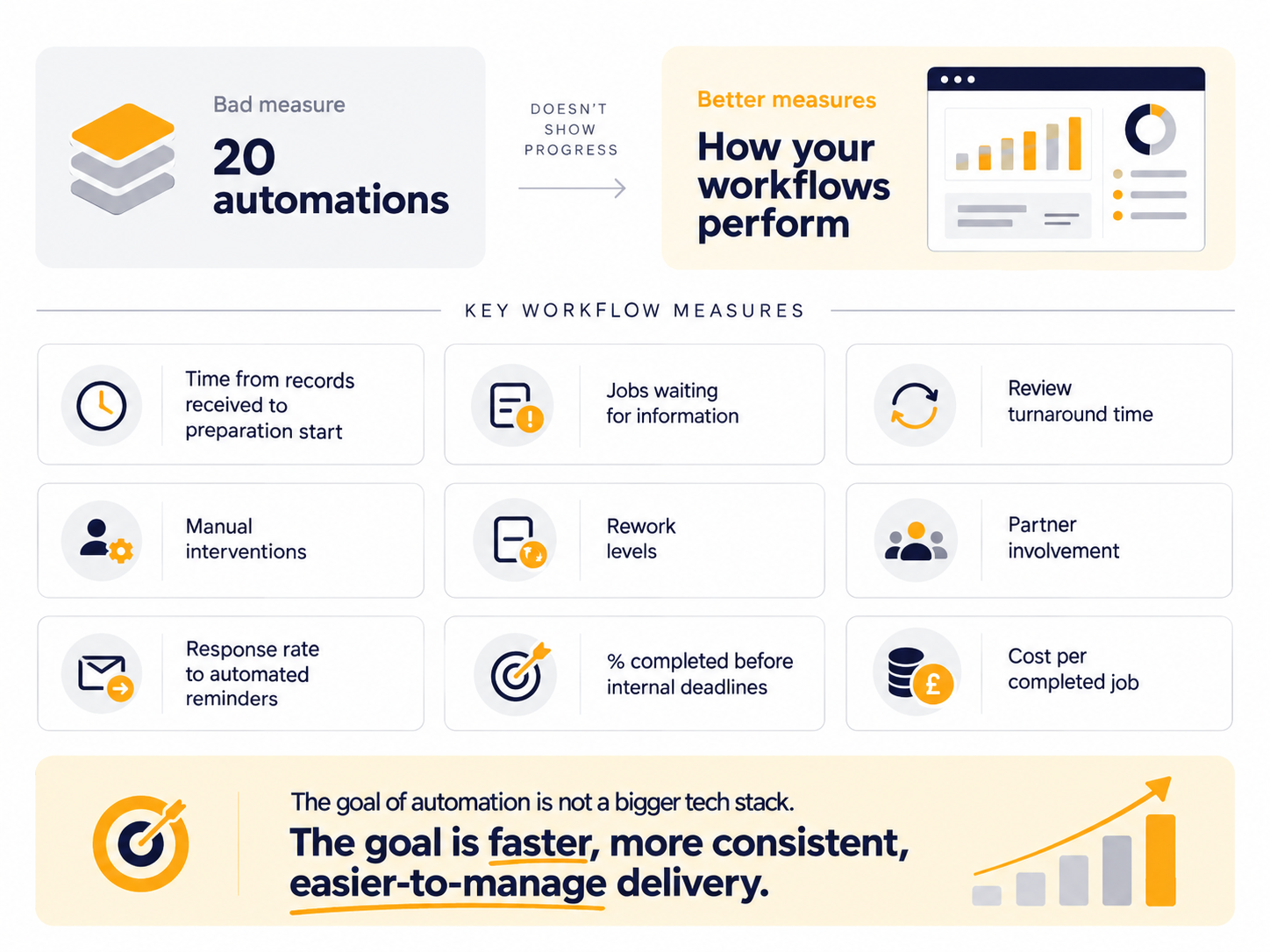
A firm should not judge automation success by saying that it has automated twenty processes. That tells you very little about whether performance has improved. More useful measures include:
- Time from receiving records to starting preparation
- Number of jobs waiting for information
- Review turnaround time
- Number of manual interventions
- Rework levels
- Partner involvement
- Response rates to automated reminders
- Percentage completed before internal deadlines
- Cost per completed job
These measures show whether the workflow is actually becoming more efficient. The purpose of automation is not to make the technology stack look more sophisticated. It is to make delivery faster, more consistent and easier to manage.
A Practical Way to Introduce Automation Orchestration
Firms do not need to redesign every process at once. A more practical approach is to start with one recurring service. VAT, bookkeeping or accounts preparation are good examples because they contain repeated stages and clear handoffs. Map the existing process from beginning to end. Identify the repetitive stages, the common exceptions and the points where work becomes delayed. Then decide which tasks should be automated, which should remain with the preparation team, which could be supported externally and which require senior review. Once that process works reliably, the same model can be applied elsewhere. This makes automation improvement more manageable and reduces the risk of introducing too many changes at the same time.
Build the Workflow Before Adding More Tools
The future of accounting automation is unlikely to involve one system doing everything. A stronger model is one in which several systems and people work together within a clearly defined process. Technology handles predictable activity. Internal or outsourced preparation teams resolve routine exceptions. Managers review quality and technical issues. Partners focus on material decisions, risk and client advice. That is the real purpose of compliance automation orchestration. When each layer understands its role and every job has a clear next step, accounting firms can increase capacity without adding unnecessary complexity. WIS BPO provides dedicated accounting support that can fit within structured, technology-led compliance workflows. Our teams support bookkeeping, reconciliations and preparation work while the UK practice retains client communication, technical responsibility and final approval.
FAQs
What is compliance automation orchestration?
Compliance automation orchestration is the coordination of software, automated tasks, human preparation and review within one defined workflow. The focus is on how work moves between each stage rather than automating individual tasks in isolation.
Is compliance automation orchestration only for large firms?
No. Smaller firms can benefit significantly because structured automation can reduce administrative work and protect limited partner and manager capacity.
Can outsourcing form part of an automated workflow?
Yes. Outsourced teams can complete repeatable tasks that still require human intervention, such as reconciliations and working-paper preparation, between automated data collection and UK review.
Should accounting firms automate everything?
No. Technical judgement, sensitive client conversations and material decisions still require experienced people. Automation should remove unnecessary repetition without removing professional oversight.
Where should firms start?
Start with one recurring workflow, map every stage and identify where time is being lost. Then decide what should be simplified, automated, outsourced or retained internally.
How do firms know whether automation is working?
Look at turnaround time, manual interventions, review time, rework, partner involvement and completion against internal deadlines. The real objective is smoother and more predictable delivery.